

In the KSeF system, once an invoice is sent, it becomes a permanent record (it remains in the system for 10 years). Therefore, if the document contains an incorrect price, incorrect quantity, or incorrect recipient, the only way to correct the error is to issue a structured corrective invoice. The system does not allow for editing or "cancelling" a document once approved.
How to record corrections?
The rules for recording correction invoices depend on their type and the method of issuance:
- Invoices in minus (in KSeF): We settle them in the declaration for the period in which they were issued.
- Invoices in plus: they are recognized in the period in which the reason for the correction arose (the principles remain
unchanged). - Invoices in minus (outside KSeF): In 2026,
unstructured invoices may still appear; they are recognized in the period when
the buyer receives confirmation of receipt. - Emergency and offline modes: These invoices are recorded in the period in which they are submitted to KSeF.
Correction invoice and the FA(3) scheme
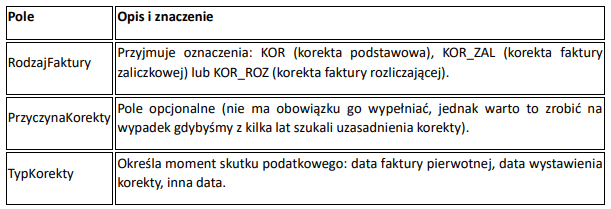
The correction invoice in KSeF has specific fields that allow the system to understand the nature of the introduced change:
Three methods of presenting changes
In KSeF, the entrepreneur has three ways to choose from to show the differences between the original and the correction.
- Difference method: The simplest form in which we only enter the difference (e.g. -500 PLN net), without showing the initial balance.
- The "StanPrzed" method is best used when VAT rates are incorrect. One
row contains the incorrect data (marked as StanPrzed), and the other contains the correct data after the correction.
The StanPrzed values are treated by the system with the opposite sign, which prevents
erroneous summing. - position reversal: A simplified version of method 2 – we present the original data with a minus sign,
and then enter the correct data without using the marker.
Incorrect buyer's Tax Identification Number (NIP
). In KSeF, you can't edit the NIP on a sent invoice. If the entered NIP is incorrect, you must first issue a correction "to zero" for the original (incorrect) buyer, and only then can you issue a new one with the correct details.
Corrections from Discounts.
The KSeF system allows you to issue a single corrective invoice for multiple original invoices. Bulk discounts allow for simplified descriptions and item counts, significantly reducing paperwork.
Best Practice: Draft First, KSeF Second.
Due to the impossibility of easily deleting e-invoices, it's worth considering sending clients draft invoice documents for approval. Only after the client confirms the accuracy of the data are we able to issue a structured invoice in the system. This will avoid unnecessary work on corrections.
This article is for informational purposes only and does not constitute legal advice.
The law is current as of January 12, 2026.
Author/Editor of the series: